The transponder monitor threshold may need to be adjusted for your aircraft to achieve reliable reporting of the Mode 3A (squawk) code.
TRANSPONDER MUST BE INTERROGATED TO MAKE ANY ADJUSTMENTS TO MONITOR THRESHOLD
The transponder needs to be in ALT mode and receiving interrogation from radar or a test set.
Most transponders have a reply indicator that illuminates when the transponder is replying to interrogation.
In order to complete this process the indicator should be illuminating at a regular interval. At a minimum the reply light should be flashing every 18-40 seconds.
If there is no indication of the reply the aircraft should be relocated to a better radar service area.
Connect to the skyBeacon Wi-Fi.
Open the skyBeacon application and view the monitor screen.
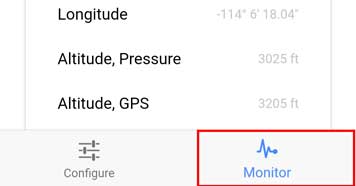
If squawk is present no adjustment is necessary. If squawk is not present as shown below proceed to the next step.
Return to the Configure screen. Tap Advanced
Scroll down to the Transponder Monitor Threshold slider at the bottom of the Advanced screen
Adjust the Transponder Monitor Threshold slider down in 1% increments.
Press Update after each change
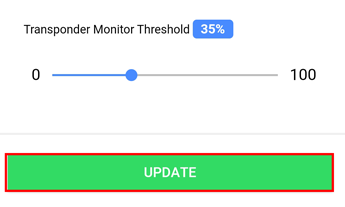
After each adjustment review the monitor screen for squawk this can take up to one minute after each adjustment.
If the transponder squawk code is showing, adjust the monitor threshold up until it stops changing then take it back down 1% until it displays again.
If the transponder squawk code is NOT showing then adjust down until the squawk code shows. Make sure to give the beacon time to pick it up. 30 seconds to 1 min before adjusting again.
Continue the adjustment until the squawk stabilizes and the correct value is displayed. For most aircraft, the squawk populates between 30-42%. The squawk value in the display should match the transponder setting. i.e. 1200 or in the example below 7777.
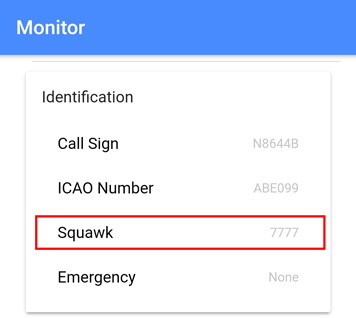
**If the squawk is showing — then you need to confirm that you have the latest software of 1.5.1. The squawk should show 0000 instead of –.
This process can NOT be performed in flight since the Wi-Fi access to skyBeacon will disable while airborne.
Comments
0 comments
Please sign in to leave a comment.